FROM POINT CLOUD TO BUILDING MODEL
Scan-to-BIM Services in Boca Raton, FL
Need Scan-to-BIM in Boca Raton? We help turn measured laser scanning point clouds into coordinated building models, with agreed levels of detail, to support renovation planning and design.
IMAGE SLOT — REPLACE THIS GROUP WITH A WORDPRESS IMAGE BLOCK
Side-by-side point cloud and Revit building model
Use a real before-and-after scan-to-model comparison where you have rights.
THE SERVICE
How does Scan-to-BIM work?
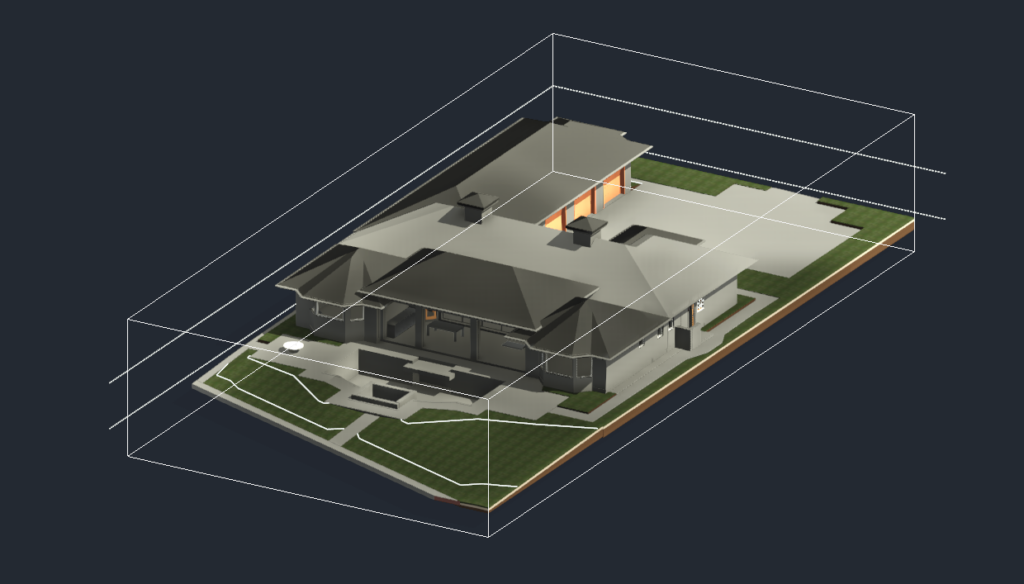
A Scan-to-BIM project generally starts with registered 3D scan data. Modelers reference the point cloud to create agreed elements such as walls, floors, columns, ceilings, openings and exposed building systems. The resulting model can support renovation planning and interdisciplinary review.
A Revit model may be the desired output, but Scan-to-BIM is about translating measured reality into a specified model—not automatically reproducing every point. Decisions about levels, families, tolerances and the needed detail are made up front.
The point cloud may contain noise, gaps or line-of-sight obstructions. Hidden conditions and assumptions should be documented, and the model should not be described as more complete than the available evidence supports.
PROJECT OUTPUTS
What should you expect to receive?
Typical deliverables can include a native Revit model, an agreed exchange format such as IFC, and supporting notes showing modeled areas and known limitations. The project team should identify the disciplines, level of information need and expected model checks before work begins.
What to include in your quote request
- Registered point-cloud source and coordinate references
- Architectural, structural or visible MEP modeling scope
- Required model elements and level of detail/information need
- File format, Revit version, project coordinates and review expectations
COMMON USES
Why teams use Scan-to-BIM
Existing building renovations: provide an editable representation of current conditions.
Design coordination: align separate disciplines around a common documented baseline.
Interior replanning: check the spatial relationship of known walls and openings.
Owner documentation: create structured records that can be maintained or extended later.
HOW PROJECTS WORK
A clear scope leads to a more useful deliverable
01. Describe the goal
Explain what the files will be used for and which building areas matter.
02. Confirm inputs
Review available plans, scan data, access needs and source limitations.
03. Agree on outputs
Define deliverable format, model/drawing detail, timing and review scope.
04. Review the result
Check the agreed files against the project scope and note open questions.
LOCAL SERVICE
Scan-to-BIM for Boca Raton projects
Boca Raton renovation teams often need answers about existing space before committing to design decisions. Scan-to-BIM is especially useful when the downstream workflow relies on Revit or another BIM system, but the required scope should reflect the actual project rather than an oversized all-building model.
FREQUENTLY ASKED QUESTIONS
Scan-to-BIM FAQs
Is Scan-to-BIM the same as laser scanning?
No. Scanning captures measurement data. Scan-to-BIM uses that data to create a structured building model.
What is the difference between point cloud to BIM and point cloud to CAD?
Point cloud to BIM focuses on modeled building objects and relationships; point cloud to CAD typically produces drawing geometry such as plans and elevations.
Can mechanical equipment be included?
Visible MEP systems can be modeled when they are in scope and the scan captures enough detail. Concealed services cannot be verified from point-cloud data alone.
What does LOD mean for my project?
Level of detail or level of development terminology can vary by standard. Define the actual elements, uses, accuracy and information you need rather than relying on a number by itself.
TECHNICAL READING
A reference for your project team
For readers who want software-specific information, here is relevant technical documentation from Autodesk. This is external documentation, not an endorsement or statement of affiliation.
Get the right files for your project
Not sure whether you need a point cloud, an as-built plan or a Revit file? Tell us the project goal and existing information. The right deliverable can be discussed before any work is promised.